Novyx Vault
FeaturesSign In

Notes for people who want AI with durable context.

An open-source second brain with persistent AI memory, rollback, bring-your-own provider keys, and markdown notes you can keep outside the app.
Get Started FreeSee All Features
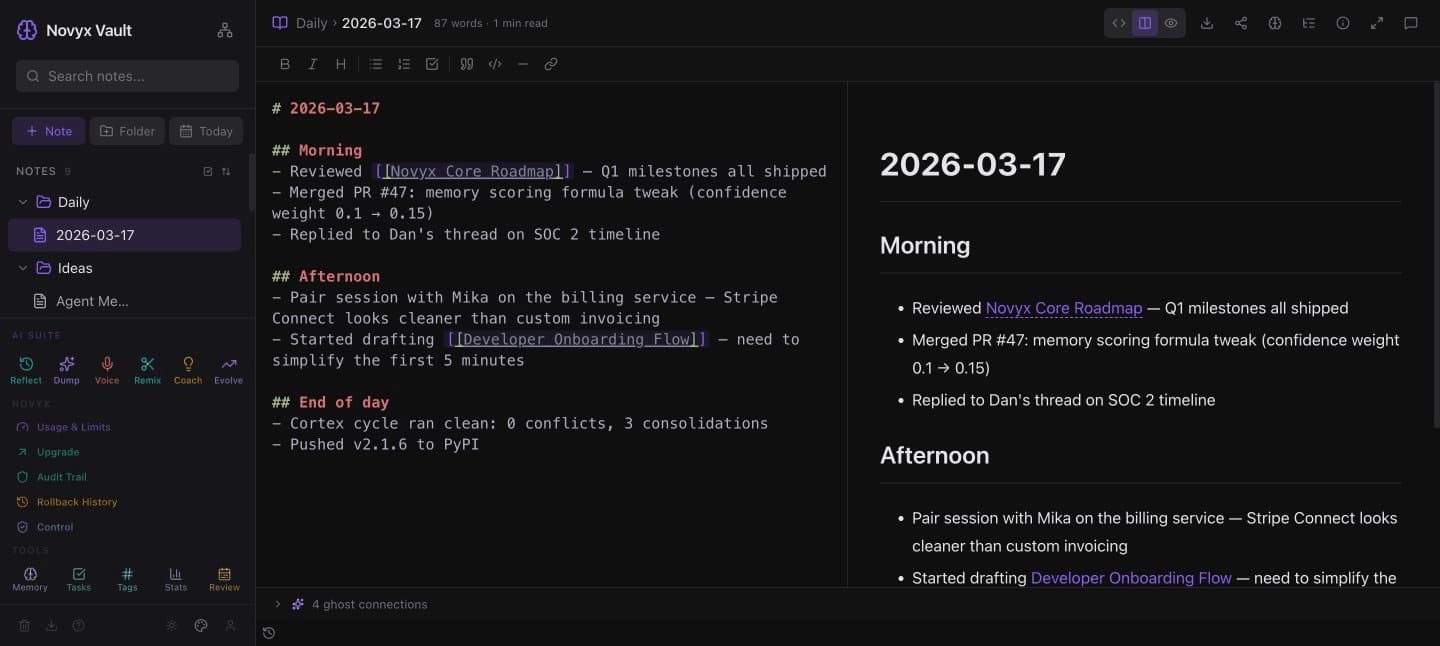
Novyx Vault — markdown editor with wiki-links, live preview, and ghost connections

Most AI note tools only see the current prompt and whatever they retrieve. You explain your project again, repeat your preferences, and rebuild context when the session changes.

Novyx Vault fixes that.

Everything you'd expect from a great notes app

Plain markdown, wiki-links, backlinks, a knowledge graph, and a fast editor. If you've used Obsidian, you'll feel at home.

Markdown Editor

A fast editor with live preview, syntax highlighting, and keyboard shortcuts. Plain markdown — no lock-in.

Wiki-Links & Backlinks

Connect ideas with [[wiki-links]]. Backlinks appear automatically. Build a web of knowledge.

Knowledge Graph

See your vault as an interactive graph. Explore clusters, orphans, and patterns at a glance.

Folders, Tags & Search

Nested folders, inline tags, full-text search. Pin favorites, drag to reorder, filter instantly.

Bring Your Own AI

21 hosted and local provider presets. Bring your own key; cloud-stored keys are encrypted at rest.

Local-First & Open Source

Desktop app stores markdown files on your machine. Cloud mode adds authenticated hosted access. Export anytime.

Voice Capture

Record meetings, webinars, or voice memos. Auto-transcribe locally or via cloud. AI structures your notes.

Now add AI with persistent context

This is what makes Novyx Vault different. Your AI builds persistent memory from your notes and conversations. The longer you use it, the more useful it becomes.

Persistent Memory

Your AI can preserve useful project, preference, and writing context across sessions. Ask about something from last month and it responds with full context. No more re-explaining yourself.

Ghost Connections

AI surfaces likely relationships between your notes — even when the connection is not already captured as an explicit link.

Timeline & Rollback

See exactly what your AI remembers and when. Made a mistake? Roll back to any point in time. Full control.

Writing Tools

Brain Dump turns raw thoughts into structured notes. Clip Remix rewrites web content in your voice. Voice Capture transcribes meetings and podcasts. Weekly Review summarizes your activity.

How it compares

Novyx VaultObsidian
Markdown filesYesYes
Wiki-links & backlinksYesYes
Knowledge graphYesYes
AI with persistent memoryBuilt inNo
AI-discovered connectionsBuilt inNo
Memory rollback & auditBuilt inNo
Voice capture & transcriptionBuilt inPlugin-dependent
Bring your own AI providerBuilt inPlugin-dependent
Open sourceMITSource-available

Works with the AI you already use

Connect your own API key. In cloud mode, keys are encrypted at rest and used only to call the provider you selected. Switch providers anytime without losing your memory or notes.

OpenAIAnthropicGoogle GeminiDeepSeekGroqTogetherMistralxAI GrokPerplexityCohereNvidia NIMHyperbolicCerebrasSambaNovaFireworksMoonshotMiniMaxOpenRouterOllamaLM Studio

Use it your way

Desktop App

Your notes live as plain markdown files on your machine. No hosted account needed. Core note editing works without internet.

macOS, Windows, and Linux via Tauri.

Cloud

Sign in for hosted access, publishing, share links, and daily digest emails.

Free tier. No credit card required.

Open Source

Inspect every line of code, contribute features, or self-host your own instance. Your notes, your data, your rules.

View on GitHub

Ready to try it?

Free to use. No credit card. Takes 30 seconds.

Get Started Free

Built by Novyx Labs

FeaturesPricingTermsPrivacyGitHub